Delta Exchange India supports deposits through IMPS, NEFT, and RTGS, allowing you to transfer funds directly from your verified bank account.
Before making a deposit, you must complete your bank account verification. This is required to ensure secure fund transfers and meet applicable regulatory requirements.
For step-by-step instructions, refer to How to Add a Bank Account?
How to Make a Bank Transfer Deposit
Log in to your Delta Exchange India account.
Click Add Funds.
Select Bank Transfer to view the available deposit options.
Select a bank option based on whether you're using IMPS or NEFT/RTGS.
Add the beneficiary details shown in your registered bank account and carefully verify all beneficiary details before initiating your transfer.
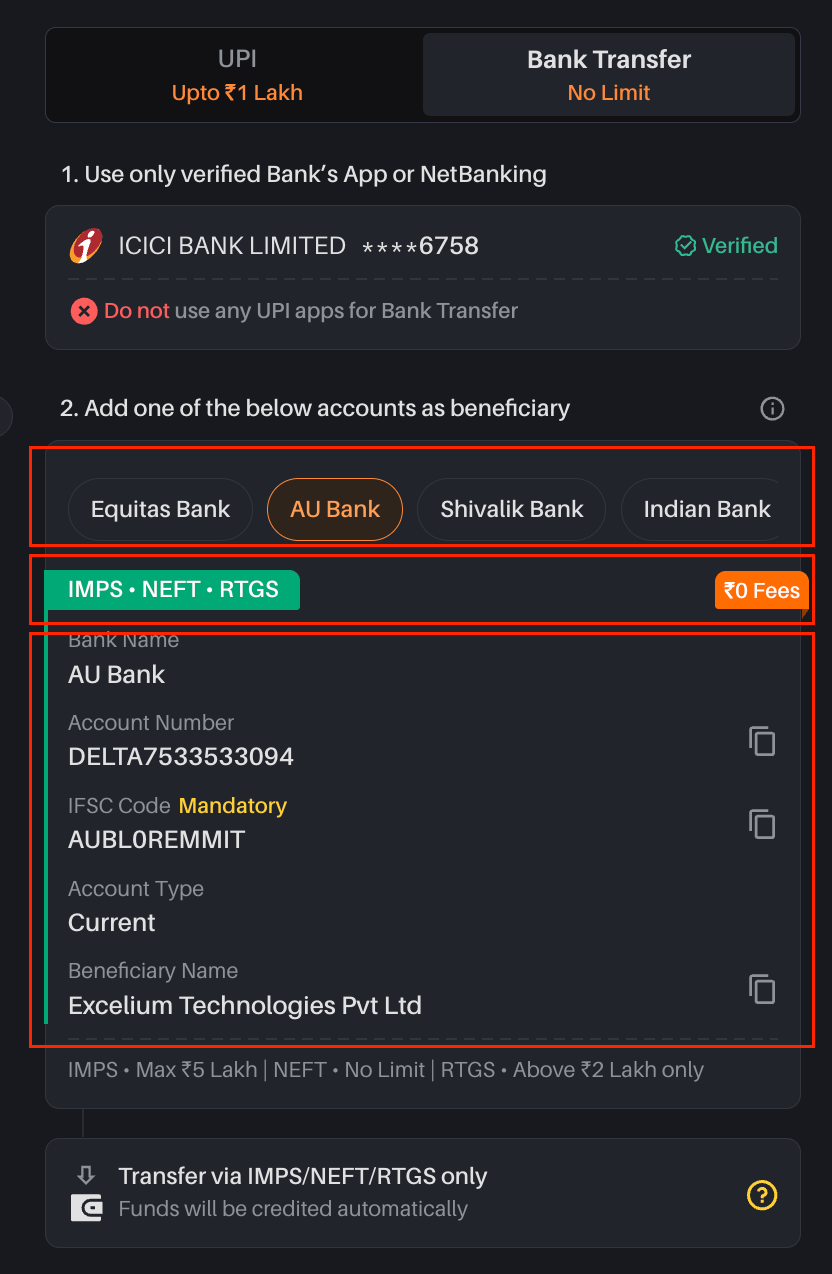
Depositing via IMPS
IMPS is suitable when you want to transfer funds instantly up to 5 lakhs amount.
Enter the beneficiary details exactly as displayed on the Delta Exchange deposit page.
Before confirming the transfer, verify that the beneficiary details in your banking app match the details provided by Delta Exchange India.
Depositing via NEFT or RTGS
For larger bank transfers, you can use NEFT or RTGS.
Transfer the funds only to the designated NEFT/RTGS bank account displayed on Delta Exchange India.
Delta Exchange India currently provides designated accounts with AU Bank and Indian Bank for NEFT/RTGS deposits.
Do not transfer NEFT/RTGS funds to an IMPS-only account.
Always verify the beneficiary account details before confirming your transaction.
Important: Use the bank account and beneficiary details displayed on the Delta Exchange deposit page at the time of your transfer. Do not rely on previously saved beneficiary details, as banking details may change.
How to Check Your Deposit Status
Once your bank transfer is completed, you can track the transaction from the Deposit History section of your Delta Exchange India account.
If the deposit does not reflect within the expected processing time, check the transaction details and ensure that:
The transfer was made from your verified bank account.
The correct transfer method and beneficiary account were used.
The beneficiary details matched the details displayed on Delta Exchange India.
The transaction was successfully completed by your bank.
Tips for a Smooth Deposit Experience
Double-check beneficiary details
Always verify the account number, IFSC, beneficiary name, and other bank details before initiating a transfer.
Use the correct transfer method
Make sure you transfer funds to the account specifically designated for IMPS or NEFT/RTGS, as applicable.
Transfer only from your verified bank account
Deposits made from an unverified bank account may not be processed successfully.
Allow for banking delays
Deposits may take longer to reflect during bank holidays, maintenance periods, or banking outages.
Contact Support if your deposit is not reflected
If your deposit is not reflected within the expected timeframe, contact our Support team via the chat option or raise a support ticket with your transaction details.
Deposit Limits & Processing Times:
- IMPS - Immediate (Max - 5 Lakh)
- NEFT - 1 hour (Max - No Limit)
- RTGS - Immediate (Min - 2 Lakh, Max - No Limit)