What Is the Price Alert Feature?
The Price Alert feature lets you receive instant notifications when a specific cryptocurrency reaches a price level you care about. Instead of constantly checking charts, you let the platform do the work for you.
Perfect for:
Spotting breakout or breakdown levels
Planning entries and exits
Staying updated without screen-watching
How to Turn On Price Alerts on Delta Exchange
Follow these simple steps:
Step 1: Open the Market Page
Log in to your Delta Exchange account and go to the Markets section.
Step 2: Find Your Crypto
Search for the cryptocurrency you want to track—BTC, ETH, or any other listed asset.
Step 3: Click the Bell Icon ?
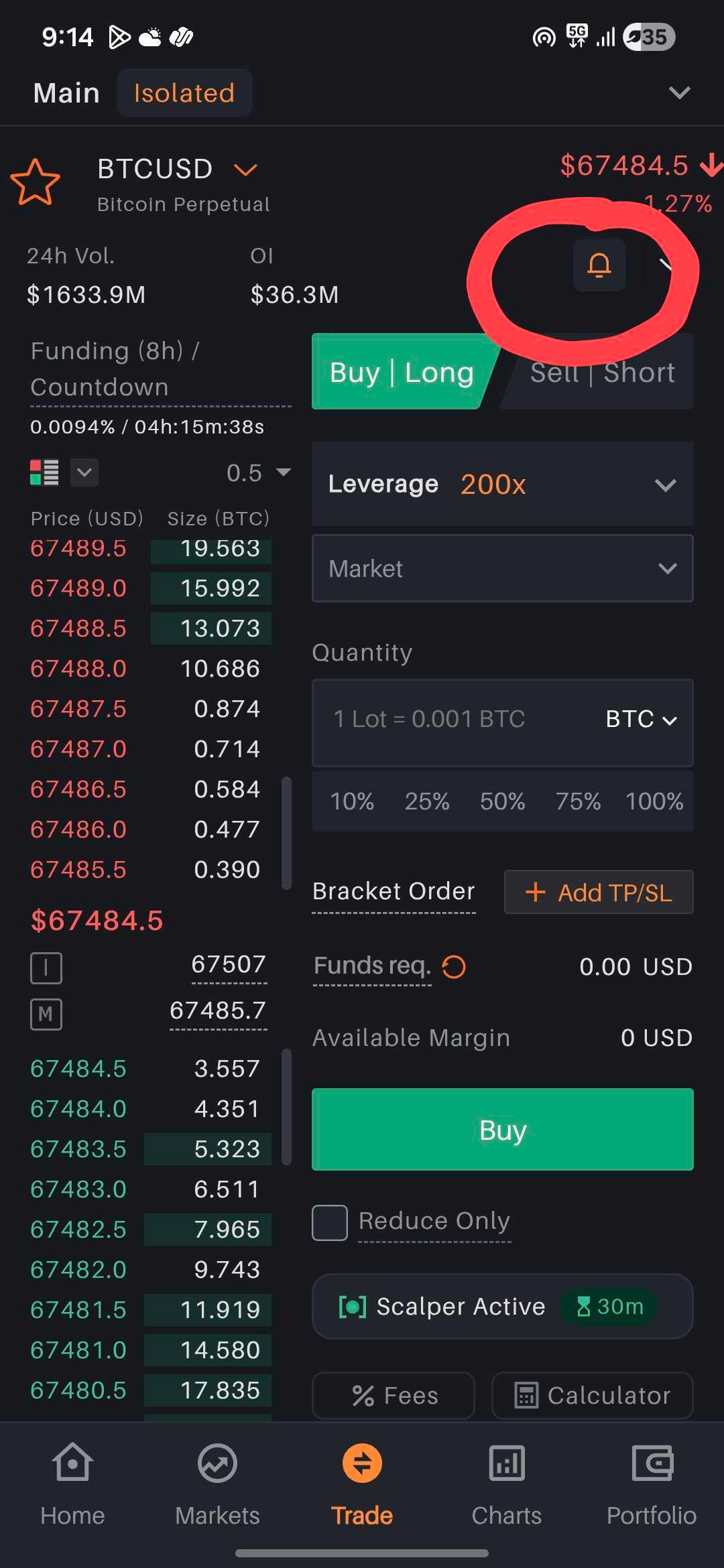
Next to each crypto, you’ll see a bell icon.
Tap or click on the bell icon, set your target price, and confirm to enable the price alert for that specific asset.
Step 4: Stay Notified
Once enabled, you’ll receive alerts whenever the price moves to your key level —so you never miss an opportunity.
Important Note ⚠️
The Price Alert feature is currently available only on the Delta Exchange mobile application and is not supported on the website.
The bell icon for setting price alerts is available only for Futures contracts and not for Options contracts.