Delta Exchange India allows users to delete their trading account through a self-service option available on the platform. To ensure account security and prevent misuse, users can initiate a self-service account deletion request a maximum of two (2) times.
If you have already exhausted both self-service attempts or are unable to delete your account through the platform, you can contact the Delta Exchange India Support Team for assistance.
If you have already exhausted both self-service attempts or are unable to delete your account through the platform, you can contact the Delta Exchange India Support Team for assistance.
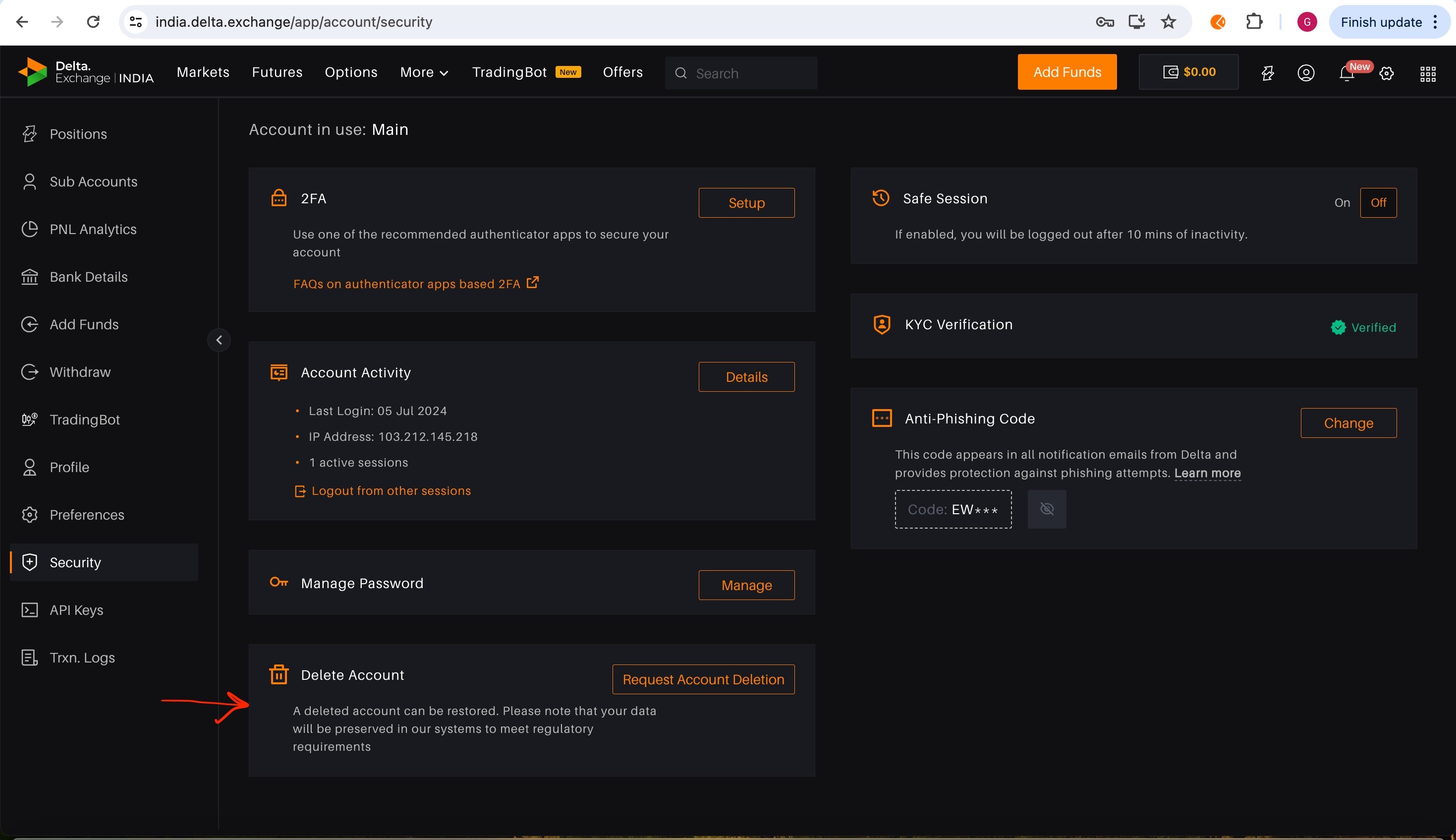
To delete your account:
1. Login to your Delta Exchange account.
2. On the left side of the screen, click the security button
3. Click on Delete Account
Please refer to the screenshot attached below for visual guidance.
Eligibility for Account Deletion:-
You may request account deletion if:
- You no longer wish to use your Delta Exchange India account.
- You are eligible for account closure under Delta Exchange India's policies.
- There are no restrictions preventing account deletion.
Prerequisites Before Requesting Account Deletion:-
Before your account can be deleted, please ensure that:
- Your account does not have any open orders or active trading positions.
- Your wallet balance is zero. Please withdraw or transfer any remaining funds before requesting account deletion.
- There are no pending deposits or withdrawals.
- There are no unresolved disputes, investigations, chargebacks, or compliance-related reviews.
- Your account is not subject to any legal, regulatory, or security restrictions.
- All mandatory verification or compliance requirements have been completed, if applicable.
Failure to meet the above requirements may delay or prevent the account deletion process.
Self-Service Account Deletion
Users can request account deletion directly from the Delta Exchange India platform up to two (2) times.
If your request is successful, your account will be processed according to Delta Exchange India's account closure policy.
Unable to Delete Your Account?
If you have already used both self-service deletion attempts or receive an error while submitting your request, please contact the Delta Exchange India Support Team.
When contacting support, please provide:
Self-Service Account Deletion
Users can request account deletion directly from the Delta Exchange India platform up to two (2) times.
If your request is successful, your account will be processed according to Delta Exchange India's account closure policy.
Unable to Delete Your Account?
If you have already used both self-service deletion attempts or receive an error while submitting your request, please contact the Delta Exchange India Support Team.
When contacting support, please provide:
- Your registered email address.
- Your User ID (if available).
- The reason for requesting account deletion again.
- A screenshot of the error (if applicable).
- Any additional information that may help us review your request.
Providing complete information will help us process your request more efficiently.
Review Process
After receiving your request, the Support Team will:
Review Process
After receiving your request, the Support Team will:
- Verify your account ownership.
- Review your account for any pending obligations or restrictions.
- Perform necessary security and compliance checks.
- Determine whether your account is eligible for deletion.
- Inform you of the outcome via your registered email address.
Please note that additional verification may be required before your request can be processed.
Processing Timeline
Processing Timeline
- Standard review time: 24–48 business hours
- Requests requiring additional verification, compliance review, or investigation may take longer.
Important Notes
- You may lose access to your trading history, account settings, and other associated data, subject to applicable legal and regulatory record-retention requirements.
- Submitting an account deletion request does not guarantee immediate approval.
- Delta Exchange India reserves the right to delay or decline an account deletion request if there are pending financial obligations, regulatory requirements, legal restrictions, or ongoing security or compliance reviews.
- If further information is required, our Support Team will contact you using your registered email address.
Frequently Asked Questions (FAQs)
1. How many times can I request account deletion myself?
You can submit a self-service account deletion request up to two (2) times through the Delta Exchange India platform.
2. What should I do if I have already used both attempts?
Please contact the Delta Exchange India Support Team with your registered email address, the reason for your request, and any relevant screenshots or supporting information.
3. How long does the review process take?
Most requests are reviewed within 24–48 business hours. Requests requiring additional verification may take longer.
4. Can my request be rejected?
Yes. If your account has open positions, pending transactions, wallet balances, compliance restrictions, legal obligations, or other unresolved issues, your request may be delayed or declined until those matters are resolved.
5. Will I receive confirmation after my request is reviewed?
Yes. The Support Team will notify you of the outcome via your registered email address once the review is complete.